
This practical guide to Mystake Bet focuses on what actually matters: bonuses, mobile access, and getting paid on time. Whether you are new to the platform or looking to fine-tune your strategy, these step-by-step instructions will help you get the most out of every session.
Quick Checklist
- Complete your registration with valid email and phone number.
- Verify your account by submitting the required KYC documents (ID, proof of address).
- Choose a deposit method that suits your country – credit/debit cards, e-wallets, or crypto.
- Claim the welcome bonus before making your first deposit.
- Set deposit limits under responsible gaming tools to stay in control.
- Enable two-factor authentication (2FA) for extra account security.
Registration
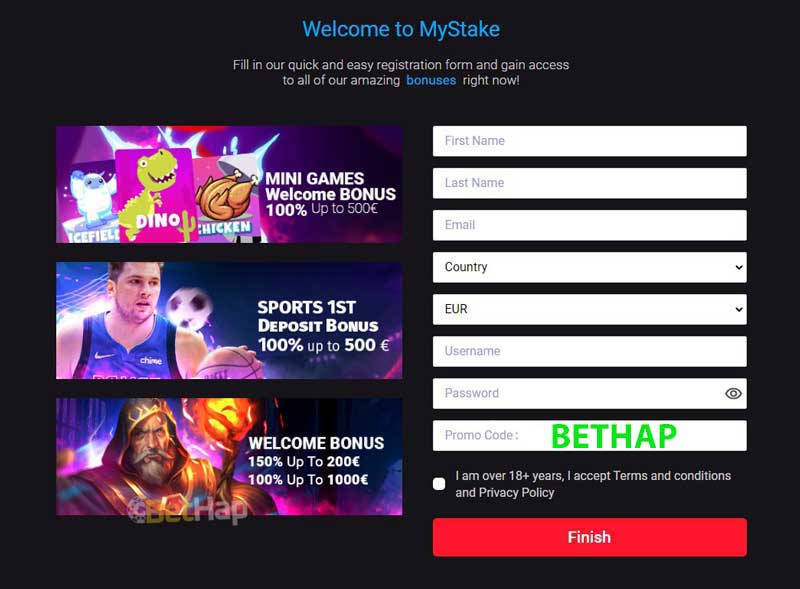
- Open your browser and go to the official site.
- Click the Sign Up button (usually top-right corner).
- Fill in your email, create a strong password, and select your preferred currency.
- Enter your personal details: full name, date of birth, and residential address.
- Read and accept the terms and conditions – pay attention to bonus rules.
- Submit the form and check your email for a verification link. Click it to activate your account.
- Log in using your credentials – the Mystake login page is straightforward.
- Go to the cashier, make your first deposit, and the bonus will be credited automatically (if selected).
How Bonuses Work
Bonuses are subject to wagering requirements (playthrough). For example, a 100% deposit bonus up to €500 with a 35x wagering requirement means you must bet 35 times the bonus amount before withdrawing any winnings.
Worked example:
- Deposit: €100
- Bonus: €100 (100% match)
- Total balance: €200
- Wagering requirement: 35x bonus = 35 × €100 = €3,500
- You need to place bets totalling €3,500 before the bonus funds become withdrawable.
Games contribute differently: slots usually count 100%, table games often contribute 10–20%. Always check the full terms under ‘Bonus Rules’ on the page.
App & PWA Guide
There is no dedicated Mystake app in official app stores, but the platform offers a fully responsive mobile‑optimized website and a Progressive Web App (PWA). Here is how to install the PWA for one‑tap access:
- On your smartphone (Android or iOS), open the Chrome or Safari browser and navigate to the site.
- Once the page loads, a banner may appear: “Add to Home Screen.” Tap it.
- If no banner, open the browser menu (three dots or share icon) and select “Add to Home Screen.”
- Name the shortcut (default is fine) and tap “Add.” The PWA icon will appear on your home screen – it launches in full‑screen mode, just like an app.
- Note: The PWA requires a stable internet connection. For the best experience, use a modern browser with JavaScript enabled.
Need to Know
How do I withdraw my winnings?
Go to the cashier, select “Withdraw,” choose your preferred method, enter the amount, and confirm. Withdrawal times vary: e‑wallets typically process within 24 hours, card payments can take 3–5 business days, and cryptocurrency withdrawals are often instant after manual approval.
Is the casino licensed and safe?
The platform holds a license from Curacao eGaming. While this is a valid license, be aware that winnings from Curacao‑licensed casinos may be subject to local income tax in certain jurisdictions – always consult a tax advisor. The site uses SSL encryption to protect personal data.
What should I do if I forget my password?
On the Mystake login page, click “Forgot Password?” Enter your registered email address, and a reset link will be sent. Follow the instructions to create a new password. If you do not receive the email, check your spam folder or contact support.
Can I set betting limits?
Yes. Under your account settings, navigate to “Responsible Gaming” and choose daily, weekly, or monthly deposit limits. You can also set loss limits and self‑exclusion periods. These tools are mandatory in many regulated markets.
Extra Tips
Payment speed can make or break your experience. Below is a quick comparison of deposit and withdrawal speeds for common methods.
| Payment Method | Deposit Speed | Withdrawal Speed |
|---|---|---|
| Visa / Mastercard | Instant | 2–5 business days |
| Skrill / Neteller | Instant | Under 24 hours |
| Bitcoin | Instant (pending network) | Up to 2 hours after approval |
For fastest payouts, choose e‑wallets or cryptocurrency. Always verify your account in advance to avoid delays.
In summary, this guide to the platform has covered registration, bonus math, mobile access via PWA, and key operational tips. Remember to always read the full terms of any promotion and play responsibly. The combination of clear rules and fast technology makes the experience both enjoyable and efficient.